
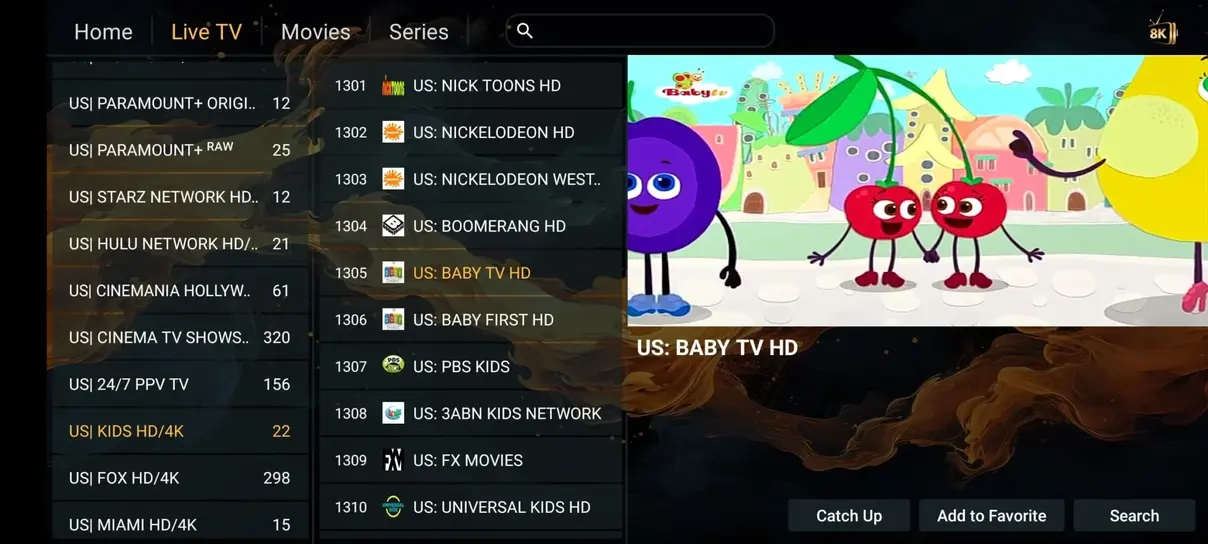
A player and a subscription do different jobs
An IPTV player is the software that displays a playlist, opens a stream, and gives you controls such as favorites and a program guide. The subscription provides the authorized account or playlist. Buying one does not automatically include the other. This distinction explains why a free app can still ask for subscription details, and why paying a player license does not create a channel package.
Start your selection with the device and account format you already have. A beautifully designed phone player may be awkward on a remote-controlled television. A portal-only app may not accept the M3U link in your activation message. Matching those practical requirements first prevents spending money on software that cannot use your account.
Match the app to the operating system
Television brands can use different software platforms across their product ranges. Samsung commonly uses Tizen, LG uses webOS, and many Sony models use Android TV or Google TV. These platforms have separate stores and compatibility requirements. Do not assume that an Android installation file can be installed on every Smart TV.
Open the store on the actual device, check the developer identity, and read the supported model information. Regional store availability can also differ. If an app is missing, an external streaming device may be a better path than an unofficial package. Our device guide explains that option without assuming that a new television is necessary.
Understand the three common login formats
M3U login uses a full playlist URL, often with account credentials embedded in its query string. Xtream-style login separates the server address, username, and password into individual fields. Portal login may associate access with a registered MAC address. Your activation message should identify the method intended for your device.
A player supporting more than one method can still present them on separate setup screens. Choose the correct screen before typing. Copying an entire URL into the username field is a common mistake, as is removing an important port number from the server address. Treat the complete playlist link as private because possession of it may expose account access.
HOT Player and television-oriented alternatives
HOT Player is one option to check for a compatible device. IBO Player and Smart IPTV are other names you may encounter in television stores. Availability, device activation, trial periods, and license terms belong to the respective developers and can change. Confirm the official listing rather than rely on a similarly named search result.
Some television players use an online device-management page to associate a playlist with the MAC address shown on the screen. Verify that page through the developer’s documentation before entering credentials. Keep the app’s device key private. The Iflex IPTV subscription team can clarify account data, but a player developer controls the app’s license and update process.
Android and Fire TV player considerations
On compatible Android-based devices, a remote-friendly player can make a large channel list easier to navigate. TiviMate, XCIPTV, and supported Smarters versions are examples viewers may compare, alongside HOT Player and other available options. Check the actual store listing or official developer source for your operating system and model.
Fire TV models do not all follow the same installation rules. Store availability, system version, and permission controls matter. Prefer an official store installation where possible. If a developer offers a compatible package outside the store, follow the permitted process for the exact device and avoid anonymous download codes or repackaged installers.
Apple devices and desktop players
An iPhone, iPad, Apple TV, Mac, and Windows computer each have their own application ecosystem. GSE Smart IPTV, iPlayTV, Cloud Stream, MyIPTV Player, Kodi, and compatible Smarters releases are examples to investigate by platform. The name alone does not establish that a version exists for your device or current operating system.
Consider how you will control playback. A desktop app can work well with a keyboard and mouse but feel cumbersome when the computer is connected to a living-room display. An Apple TV app should support the remote gestures and audio setup you use. Check these basics before paying for optional premium player features.
Guide quality matters more than a long menu
A useful electronic program guide is readable from your normal viewing distance and responds predictably to the remote. Compare how the player moves between channels, dates, and program details. Check whether it can refresh the EPG separately from the playlist and whether it exposes a time-offset setting for troubleshooting.
Guide support in the player does not create missing schedule data. The subscription’s EPG must match the channel identifiers and cover the requested time period. If the guide is empty for one channel but populated elsewhere, reinstalling the app may not help. Our M3U and EPG page explains the account-data side of that problem.
Favorites, search, and household controls
The best navigation features are the ones your household will actually use. Try adding a favorite, searching for a channel by name, and returning from a movie to live television. A large catalog is easier to manage when the app lets you hide unused groups instead of scrolling through everything every evening.
If children use the device, check how parental controls protect categories and whether the PIN is required after the app restarts. Test the setting yourself rather than assume a hidden category is locked. Keep the account password different from a simple family viewing PIN, and avoid sharing the administrator controls with every user.
Audio, subtitles, and video decoding
A player can expose audio and subtitle menus only when the source and app support those tracks. Before choosing an app mainly for multilingual viewing, test the language controls on relevant content. Also check whether the player remembers your preferred track across episodes or falls back to the default each time.
Picture problems may involve the device decoder rather than the internet connection. If sound plays while the screen is black, try the app’s supported decoder setting or a lower-resolution source, changing one variable at a time. Do not install codec packs from unknown websites. Consult the player developer when the same file type fails consistently.
Licenses, trials, and renewals
Read the player’s payment screen separately from the subscription offer. A player license may be per device, per platform, or linked to a store account. A free trial can expire even while your content subscription remains active. Keep both receipts so you know which company to contact if an activation prompt appears later.
Before paying for an app, use any available trial to check remote navigation, guide import, and account compatibility. Do not interpret a player’s premium tier as an upgrade to your channel package or simultaneous-screen allowance. Those service limits remain part of the Iflex IPTV plan you selected.
A short comparison you can repeat
Choose two compatible candidates at most and test the same small set of tasks on each. Add your authorized account, open three familiar channels, inspect the guide, play one available on-demand title, and test an audio or subtitle change. Note whether favorites survive a normal app restart.
Keep the network, device, and stream quality the same during the comparison. Otherwise a better Wi-Fi moment can look like a better player. If one candidate fails, record the exact step and error rather than immediately importing a second account. You will get a clearer result with fewer variables and less duplicated configuration.
When to change the app instead of the plan
A confusing interface, missing accessibility option, or unsupported codec can justify trying another compatible player. A higher-priced subscription will not necessarily fix those application issues. Conversely, a better-looking player will not increase a one-screen account’s simultaneous-stream allowance or supply a channel outside the package.
Describe the limitation to support before replacing hardware or buying a longer term. The installation guide can help you move the same account into a new player, while the pricing page handles changes to screen count and duration. Keep the original app configuration until the replacement works so you have a known reference if something is missing.